Resolve a specific issue
Intermittent internet, a troublesome server, or an incident your team needs help investigating.
Diagnosis and recovery with the work and budget agreed upfront. No management contract required.
Discuss your issue
Personal IT support · South Limburg
A fault that keeps coming back? Need extra expertise alongside your own IT team? I investigate workstations, networks and servers, without requiring you to replace your current provider.
10+ years in outsourced and in-house IT support
7 years of in-house IT at a dental organisation
Based in Kerkrade. Remote across the Netherlands.
Help that fits your situation
You can get help without replacing your current IT provider or systems.
Intermittent internet, a troublesome server, or an incident your team needs help investigating.
Diagnosis and recovery with the work and budget agreed upfront. No management contract required.
Discuss your issueNeed to know where the main concerns are? Start with an overview of your environment.
Findings and priorities within an agreed scope. Improvements and in-depth investigation are separate work.
Discuss an IT checkMaintenance, updates and help for an environment I get to know and keep track of.
A more thorough initial assessment, with clear terms for the plan, startup costs and contract duration.
Discuss ongoing supportDescribe what your staff are noticing. I turn that into a focused investigation and explain the options and costs in plain language.
Your own IT specialist or provider can stay involved. We agree what I investigate, what access is needed and who makes each change.
From symptoms to investigation
A fault may disappear while someone is looking. I look for patterns and investigate how the different parts affect each other.
A familiar investigation question
The connection seems fine, but briefly drops at irregular intervals. Where in the chain does it happen?
Which workstations or locations are affected? Does it happen at the same time? That helps identify where to investigate.
Check connections, logs and settings. Tests at different points help narrow down the problem.
I explain the findings and which next test or change will help move the investigation forward.
Hands-on experience with
Daniel Orosz · my background
“When Daniel walks in, everything starts working again. As if by magic.”
I helped colleagues with practice software, settings, and printer and computer issues. I knew their working environment and the problems that kept coming back.
In outsourced IT support, I worked across varied business environments: user support, workstations, networks and servers. That taught me to adapt quickly and investigate how systems affect one another.
I then worked inside a dental organisation with several locations. Practice software, X-ray connections and helping staff were as much a part of the job as Windows, Google Workspace and backups.
Practical experience investigating RDP breaches and ransomware, protecting backups against encryption and overwriting, network segmentation and least-privilege access. Also experienced in migrating mail and other servers from old office PCs to a secured VPS.
During seven years of IT support at a dental organisation with several locations, no security incidents occurred.
How we work together
What happens, when does it happen and what has been tried? We also discuss whether remote or on-site help fits.
We record scope, budget, access and timing. You know which first step you are paying for and when we will review progress.
I investigate the environment and discuss findings. Changes and additional work are agreed before I carry them out.
You receive findings, actions taken and next steps. You then decide whether you need any further help.
You discuss the assignment with the person doing the work.
Based in Kerkrade · Chamber of Commerce 98242482.
We agree an NDA and, where needed, a data processing agreement upfront.
Clear about costs
All prices exclude VAT. After the minimum charge, you pay for time actually spent.
€55/ hour
Minimum 1 hour (€55)
For diagnosis and support at a distance.
Discuss your needs€65/ hour
Minimum 2 hours (€130)
For investigation and work at your location.
Discuss your needsFixed price
Elsewhere: €0.50/km from my home address in Kerkrade, for the return trip. Travel time is not charged separately.
A targeted, sample-based review with findings and priorities. We confirm the number of workstations, servers and questions to investigate beforehand.
€150 excl. VAT covers up to 10 PCs without servers; €250 covers up to 50 PCs and 2 servers. A smaller setup with a server also falls under €250. Larger environments need a quote. The check provides brief findings and priorities. Full testing of every device, extended incident investigation, recovery and reconfiguration are agreed separately. Travel terms are listed with the rates.
Discuss your Quick ScanMinimum charges apply to one-off hourly work. Beyond the minimum, we charge actual time spent. A fixed Quick Scan price replaces hourly charges and minimum hours; travel is added separately only outside Kerkrade, Landgraaf, Heerlen and Maastricht. More than 50 PCs or 2 servers requires a quote agreed before starting.
In Heerlen: 2 × €65 = €130 excluding VAT. For a client outside the four towns, 20 km from my home: €130 + 40 × €0.50 = €150 excluding VAT. Travel time is not charged separately.
Better prepared together
Calculate your monthly estimate below. Maintenance and usual remote help, with scheduled checks and an agreed allowance for urgent visits.
An initial price estimate. Your final quote follows a conversation and intake.
Each PC or laptop counts as one workstation.
Physical and virtual. No servers? Choose 0.
Your first location is included.
You can also type: 0–500.
Select extra requirements for your quote. This does not change the monthly estimate. We agree what fits within your management scope and what is quoted separately.
An extra planned visit each quarter, with up to 2 hours on site. Together with your team, we discuss what slows work down, how to use IT more effectively and which improvements would help most.
This advice visit is additional to the other included visits. Larger changes, equipment and licences are agreed separately. Standard travel terms still apply.
Your final quote follows a conversation and intake, with an introductory visit where needed. Startup work, equipment, licences, storage and any travel charges are quoted separately.
Your plan includes
The initial inventory, network topology, overdue updates, optimisation and setup are quoted separately. Pay startup costs upfront or spread them by agreement. The quote specifies the term, total cost and early termination conditions before you commit.
Additional work is agreed first: €45/hour remotely and €55/hour on site. Extra contract visits have no two-hour minimum. Standard travel terms still apply. A paid 4- or 2-working-hour SLA is available only where capacity and agreed coverage allow. Pricing and priority are set out in the quote first. The SLA clock pauses outside working hours.
During the intake, we discuss your IT environment, the support you need and my availability. Your quote sets out the plan, schedule and response times. An introductory visit can be arranged by appointment.
Hardware, software licences and cloud and backup storage are outside the subscription price. If outdated or unsupported equipment needs replacing for responsible management, we discuss the cost and get approval first. Cabling, network outlets and cabinet installation are agreed and quoted separately.
Good to know
Some practical answers are below. If your question is different, feel free to get in touch.
A useful starting point
A few specific details help me understand your question. There is no need for lengthy preparation.
For example, an error message, a slow connection or a device that is not working.
Is it constant, or does it return at particular moments?
Which colleagues or tasks are being held up?
Kerkrade, Zuid-Limburg · Mon–Fri, 9:00 AM–6:00 PM
Urgent support by arrangement
From everyday practice
Explanations and experience about the IT behind your daily work.

22 October 2026
Why part of an office kept losing internet: a USB Wi-Fi adapter, misconfigured connection sharing and two devices claiming the gateway address.
Read the article →
2 May 2026
The best IT support is the IT you don't notice. No outages, no repeated questions, staff who just get on with things. What that actually looks like and how to tell whether your IT is working preventively or just reacting.
Read the article →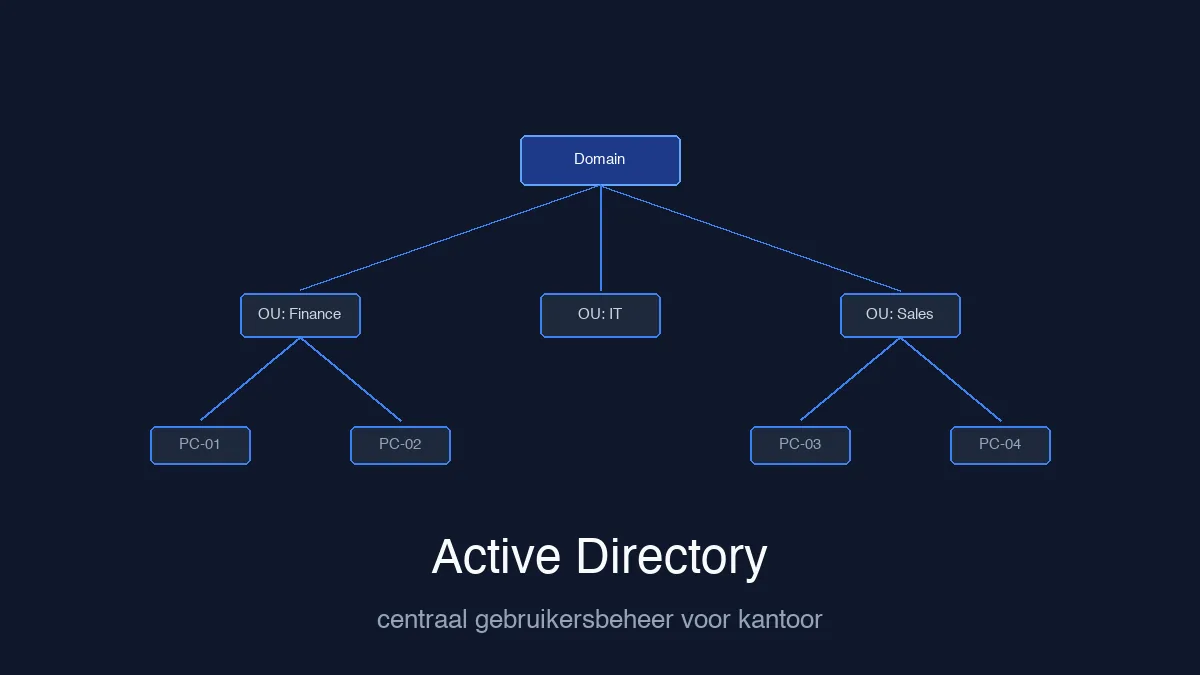
25 April 2026
Manage users, access rights and group policy centrally. A practical case about secure settings, everyday workflows and clear communication during changes.
Read the article →