
I told staff to put their password in the desk drawer. Seriously.
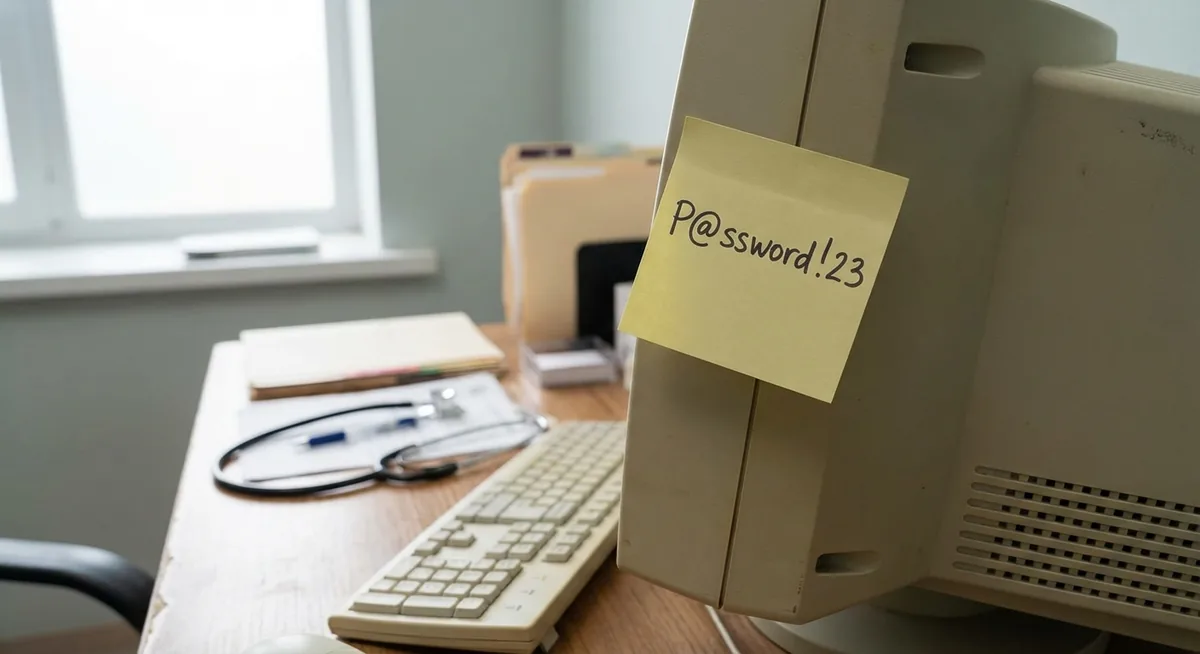
First week at a new place. Reception desk. On the monitor — a Post-it. On the Post-it — a password.
I walked through every room.
Reception, treatment rooms, the back office. Seven monitors. Every monitor had a Post-it. Every Post-it had a password.
I could have sent a stern email. Drawn up a security policy. Scheduled a meeting.
I didn’t. Instead I said the same thing to everyone: take the Post-it off the screen and put it in the desk drawer.
Short version: a Post-it on the monitor and a Post-it in the drawer aren’t the same thing. The first is visible to anyone who walks past. The second requires physical access to your specific desk. Neither is ideal. But in a small business, ideal is a plan for next year. And until then: the drawer is better than the screen, and both are better than a passwords.txt file on the desktop. That’s what this post is about.
Why the desk drawer isn’t a joke
The classic security advice: never write down passwords. Full stop.
Good advice. Unrealistic.
People will always find a way to avoid memorising passwords. That’s not laziness — that’s people. Receptionists at a dental practice work with five different systems. Dental software, X-ray software, the till, email, the insurer’s portal. Each with its own password requirements. Some force a change every 90 days.
The question isn’t whether they write it down. The question is where.
A Post-it on the monitor is visible to the delivery driver, the patient in the waiting room, the new employee on their first day, the cleaner in the evening. To everyone who walks past.
A Post-it in the desk drawer requires: physically showing up, opening the right drawer at the right desk, in the right building, during working hours. That’s already a completely different level of access.
Not ideal. But better.
And a passwords.txt file on the desktop is a different story altogether. That’s accessible remotely — to anyone logged in via TeamViewer or who’s infected the machine with malware. A physical note in a drawer is literally more secure in that respect.
Honestly: I did it myself too
I have to confess something.
In my early years I had a file called New file.txt with passwords in it. Later I started encrypting it — I’d put it in an archive with a password, so you couldn’t just open it. First unzip it, then read.
That was my own temporary solution, while the real solution — a password manager for the whole organisation — was still sitting in the plans.
Not ideal. But better than a plain text file on the desktop.
That’s exactly the core of security at a real small business: not the perfect system, but a system that’s better than the last one. Step by step.
There was a plan. Management didn’t want to listen.
I was never planning to stay at that temporary solution forever.
There was a ready-made plan for rolling out a password manager. Specific product, budget, phased approach. I was working through the alignment process — first explaining why it was needed, then calculating the costs, then waiting for space in the budget.
Management’s response was along the lines of: “We just want to click and have it log in. Without passwords.”
They meant SSO or automatic login — which is technically possible and even correct with the right setup. But not in the context they said it. They just wanted staff to never think about passwords again. No policy, no rules, no managers.
After that I had less and less time for IT altogether. For management it was more important that I covered a shift at reception. Or processed internal documents. Or handled purchasing. Real IT tasks — updates, security, documentation — kept sliding further back.
The password manager stayed in the Plans folder.
What actually works in a small business
Ideal password security looks like this: a password manager for every employee, SSO where possible, Windows Hello or other biometrics, mandatory change when staff leave.
The reality of a small business looks different: the budget goes elsewhere, the IT person spends half their time on non-technical tasks, and every change means convincing people for whom it works fine right now.
Hence: the pragmatic minimum version you can actually implement.
Post-its in the drawer, not on the screen. Costs nothing and takes one conversation. It removes the most visible risk — a random glance from an outsider.
No password files on the desktop. passwords.txt, an Excel file, a Notepad note — that’s worse than a Post-it because it’s accessible remotely. Ban it and explain why.
When someone leaves: change passwords the same day. Not next week. That day. This is the one thing that genuinely has to be a hard rule.
If there’s any budget at all: Bitwarden. The free version works for a small team. Not the ideal enterprise SSO — but it’s a real step forward from Post-its. Can be set up in a day.
Three questions I get asked
Isn’t a password manager too complicated for non-technical staff? Bitwarden and 1Password are specifically built for people who don’t think about IT. A browser extension, one button. The hard part is explaining why it’s needed — not teaching how it works.
What if an employee leaves and knows all the passwords? This is exactly the strongest argument for a password manager: with a shared vault you reset access in one place. Without one you never know exactly what someone had access to.
Do you have to change all passwords after a ransomware attack? Yes, immediately. If an attacker was in the network, assume everything visible on screens and in files was seen. Changing passwords is the first thing you do after an incident — before resuming normal operations.
Want to know what a real ransomware attack looks like? Read: ransomware at your office — what do you do when it goes wrong.
Want to know where the real vulnerabilities are in your office — not the theoretical ones, but the ones that actually matter for your specific situation? I do a practical IT check for small businesses in Limburg.